
The four states, side by side
| State | What you can still do | What is blocked | Way back |
|---|---|---|---|
| Frozen | Read your chats | Sending messages and posting content | Appeal directly from the app |
| Limited (non-contact limit) | Message your contacts normally | Messaging people who do not have your number saved | Appeal the limit if it was applied wrongly; otherwise wait it out by not repeating the reported behaviour |
| Deleted | Nothing — the account no longer exists | Everything | None. Deletion is irreversible |
| Banned | — | — | Since April 30, 2025, a ban no longer logs you out at once. Banned accounts become frozen accounts instead, with an in-app appeal |
The word "banned" causes most of the confusion. Before April 2025, a banned user was logged out immediately. Telegram's April 30, 2025 blog post changed that: banned violators now get a frozen account instead — they cannot contact other users, but they can submit an appeal, and a successful appeal unfreezes the account. So if you can still open Telegram and read your chats but cannot send anything, you are most likely frozen, not deleted — and there is a route back.
Step 1 — Identify your state from what you see
- You can read chats but cannot send messages or post. Your account is frozen: Telegram's FAQ defines a frozen account as one restricted because of reports from other users, readable but unable to send or post. Read the full notice in the app for the reason and the appeal action.
- You can message some people but not strangers. Your account is limited, not frozen. Telegram's FAQ explains that when users report unwanted messages from an account, a limit is applied: the reported account can only send messages to people who have its number saved as a contact. This limit targets unsolicited messages to people you do not know. If you believe it was applied wrongly, Telegram's FAQ points to a page for challenging it.
- You cannot log in, and Telegram says the number is not registered. The account may have been deleted — by you, or automatically after long inactivity (see below). A deleted account cannot be restored; signing up again creates a new, empty account.
- You are logged out and cannot get a login code. That is a login problem, not a ban. Work through our login code guide before assuming the account was restricted.
Do not guess which state applies. The notice on screen is the authority: a frozen account shows a frozen notice, a limited account shows the messaging limit when you try to contact a stranger, and a deleted account simply is not there.
Step 2 — Appeal a frozen account from inside the app
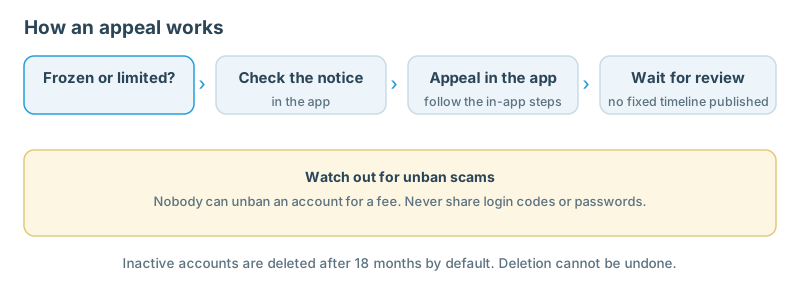
Telegram's FAQ states the appeal route in one sentence: you can appeal the restriction directly from the app, Telegram's moderators will review your case, and if the restriction was a mistake, your account will be unfrozen. Follow these steps:
- Open Telegram on the device where the account is frozen and read the full frozen notice.
- Use the appeal action Telegram shows in the app. Do not search for a bot or a website to appeal through — the route Telegram offers in the app is the route.
- Write a short, factual appeal: when the freeze appeared, what you were doing, and why you believe the restriction was a mistake. Do not invent explanations or copy someone else's template.
- Submit the appeal once and keep a note of the date you submitted it. Submitting the same appeal repeatedly does not speed up a review.
- While the appeal is pending, do not evade the freeze by creating a second account to continue the same activity.
Telegram publishes no timetable for appeal reviews, and this guide quotes none. Any site promising a specific review time is not quoting Telegram.
Step 3 — Appeal a non-contact limit
The non-contact limit is narrower than a freeze, and it has a narrower fix.
- Confirm it is a limit, not a freeze: you can still send messages to people who have your number saved, but not to strangers.
- If the limit was applied wrongly — for example, you only messaged people you know — use the challenge route Telegram's FAQ links from the "Can't send messages to non-contacts" section.
- If the limit was applied because you messaged strangers repeatedly, the honest fix is to stop. The limit exists because other users reported unwanted messages. Continuing the same behaviour keeps the reports coming.
- Review your privacy settings while you wait — our Telegram privacy settings guide covers who can message you and how your number is visible.
Step 4 — The waiting period: what to do and what not to do
Waiting is part of the process, and how you spend it matters.
- Do not pay anyone for an "unfreeze". No third party can appeal on your behalf or speed up Telegram's moderators. Anyone selling an unfreeze service is selling something they do not have.
- Do not hand your login code or Two-Step Verification password to anyone. Telegram will never ask for them. A "support agent" who asks for a code is running a scam — see the warning section below.
- Do not delete the app or log out of the frozen account. Logging out does not lift a freeze, and it destroys your Secret Chats, which are tied to that login session.
- Keep the phone number on the account active. Losing the number while frozen removes your last way back in.
If the in-app appeal action does not open at all, report it through Telegram's support form at telegram.org/support, describing the notice and the failure.
Step 5 — Self-destruct and deletion: what is gone for good
Deletion is the one state with no appeal, so it is worth understanding before it happens.
- Deleting your account is permanent. Telegram's FAQ states that deleting your account permanently removes your messages and contacts, that the action must be confirmed through your Telegram account and cannot be undone, and that termination is irreversible. If you sign up again, you appear as a new user and do not get your history, contacts or groups back.
- Inactive accounts self-destruct. If you stop using Telegram and do not come online for at least 18 months, your account is deleted along with all messages, media, contacts and everything else stored in the Telegram cloud. Eighteen months is the default setting, and you can change the period in Settings. The FAQ repeats the same default in its stolen-phone section: inactive accounts self-destruct automatically after a period of time, 18 months being the default.
- A frozen account is not yet a deleted account. Freezing is a restriction with an appeal; deletion is the end of the account — so submit the appeal in Step 2 promptly.
If your problem is a missing login code rather than a restriction, start with our login code guide.
Warning: unfreeze scams
A frozen account is a prime target for scams. Every one of these is a scam:
- "Pay to unfreeze your account." Telegram does not charge for appeals, and no payment can lift a restriction.
- "Send us your login code to verify your appeal." Telegram will never ask for a verification code or your Two-Step Verification password. A code you share logs someone else into your account.
- "Appeal through this bot / website / support chat." The appeal route is the one Telegram shows in the app. A bot or site that asks for your number and code is harvesting your account.
- "We are Telegram support" in a private message. Official notifications come only from Telegram (42777) and @AbuseNotifications (4240005).
- A message that your account will be deleted unless you act within minutes. Urgency is the scam's tool. Read the actual notice in the app instead.
If you already shared a code, act as if the account is compromised: from a signed-in device, go to Settings > Devices and end sessions you do not recognise, and turn on Two-Step Verification. See also our Telegram bot safety guide.
Frequently asked questions
Is a frozen account the same as a banned account?
Since April 30, 2025, effectively yes. Banned violators now get a frozen account instead of being logged out at once, and a successful appeal unfreezes it. "Banned" describes what happened; "frozen" describes the state your account is in now.
How long does an appeal take?
Telegram publishes no review time, and this guide does not quote one. Submit a factual appeal promptly through the route in the app, then wait. Repeated submissions and paid "fast-track" services do not help.
My account was deleted. Can I get it back?
No. Deletion is irreversible: messages, contacts and groups are gone, and signing up again creates a new, empty account — whether you deleted it yourself or it self-destructed after at least 18 months of inactivity.
Someone offered to unfreeze my account for a fee. Is it real?
No. There is no paid unfreeze service. Telegram's moderators review appeals submitted through the app, and no third party can influence that review.
Related guides
Official references
- Telegram FAQ — What is a Frozen Account?
- Telegram FAQ — Can't send messages to non-contacts
- Telegram FAQ — How do I delete my account?; How does account self-destruction work?; My phone was stolen, what do I do?
- Telegram FAQ — Service Notifications on Telegram
- Telegram Blog — Extra-Secure Group Calls, Automated Accounts, and More, April 30, 2025